
Customs Form Generator: CN22, CN23 and PS 2976 Worksheet
Fill a CN22 or CN23 customs declaration form in the UPU 2026 layout, or a worksheet with every box of USPS PS Form 2976-R. Each line is checked for HS digits and country of origin, totals add up for you, and a Shopify orders CSV becomes one form per order. Free PDF, no signup.
CN 22, CN 23 or a USPS Form: the Carrier Decides
Rules last checked against USPS, UPU, CBP and European Commission sources on 19 November 2026.
The form depends on who carries the parcel, not on what is inside it. Pick the carrier first, then the form follows.
- USPS, sending from the US. USPS prints the customs form itself from your data. Priority Mail Express International uses PS Form 2976-B, and Priority Mail International uses PS Form 2976-A, at any value. First-Class Package International Service (FCPIS) uses PS Form 2976 or 2976-A, but only up to $400 in value and 4 lb in weight (USPS IMM Exhibit 123.61, IMM 251). Over $400, FCPIS is not allowed at all.
- Another postal service (Royal Mail, Canada Post, Australia Post, Deutsche Post and the rest). These use the UPU forms. A letter-post item or small packet takes a CN 22 when the whole declaration fits on it, and a CN 23 when it does not. A parcel always takes a CN 23. Printing your own CN 22 or CN 23 needs your post's permission under the UPU rules, so check that it accepts a printed form.
- A courier (DHL, FedEx, UPS). Couriers are not postal operators, so the CN forms do not apply. They usually take the customs data electronically when you book the label, and most ask for a commercial invoice for goods.
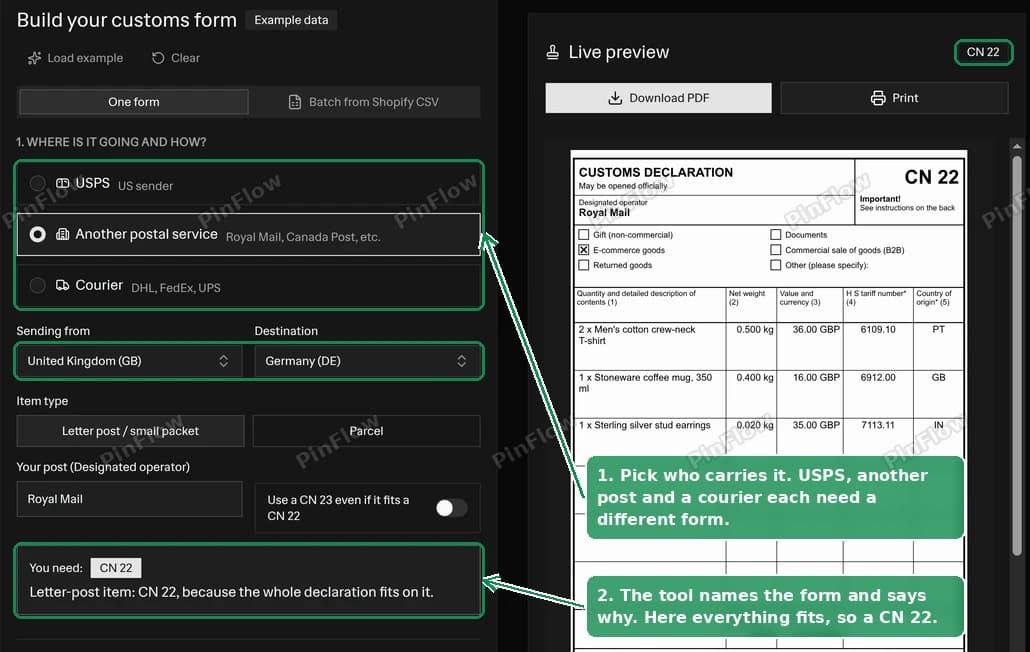 Customs form generator with Another postal service, United Kingdom to Germany, showing "You need: CN 22" and the CN 22 preview
The tool asks these questions in step 1 and tells you, in one sentence, which form you need and why. If a line is added that pushes a CN 22 past its rows, it moves you to a CN 23 and says so. Pair the customs declaration with a packing list in the box and a shipping label on the outside.
Why You Can't Print Your Own USPS Customs Form
USPS stopped accepting handwritten customs forms in 2020. A notice signed in January 2020 said that from March 2020 USPS would no longer accept any article bearing a handwritten customs declaration (Postal Bulletin 22537). A March notice moved retail counters onto PS Form 2976-R and set 13 September 2020 as the final end for handwritten forms in the mail stream (Postal Bulletin 22541). The rule entered the International Mail Manual on 24 September 2020 (Postal Bulletin 22555).
Today IMM 123.11 says "a fully completed electronically generated customs form is required for international mail" (IMM 123). The old hard-copy 2976 and 2976-A sets are "obsolete and prohibited from use". A privately printed 2976 also needs written USPS authorization and a barcode USPS equipment can read (IMM 123.31). So a PDF of PS Form 2976 from any free website is not something USPS will take.
You have two routes that work:
- Click-N-Ship or your shipping app. You type the customs data online and print the label with the form built in.
- PS Form 2976-R at the counter. This is a free paper worksheet, titled "USPS Customs Declaration and Dispatch Note". You fill it in by hand and hand it over with the parcel. The clerk keys it in and prints the real customs form. The 2976-R says on its face that it is an intake sheet used to create the customs form, not the customs form itself (PS Form 2976-R).
That is why this tool gives US senders a customs data worksheet and not a USPS form. The worksheet uses the same block numbers as the 2976-R (September 2025 edition), so you can copy each box across in a minute, or keep it open while you type into Click-N-Ship.
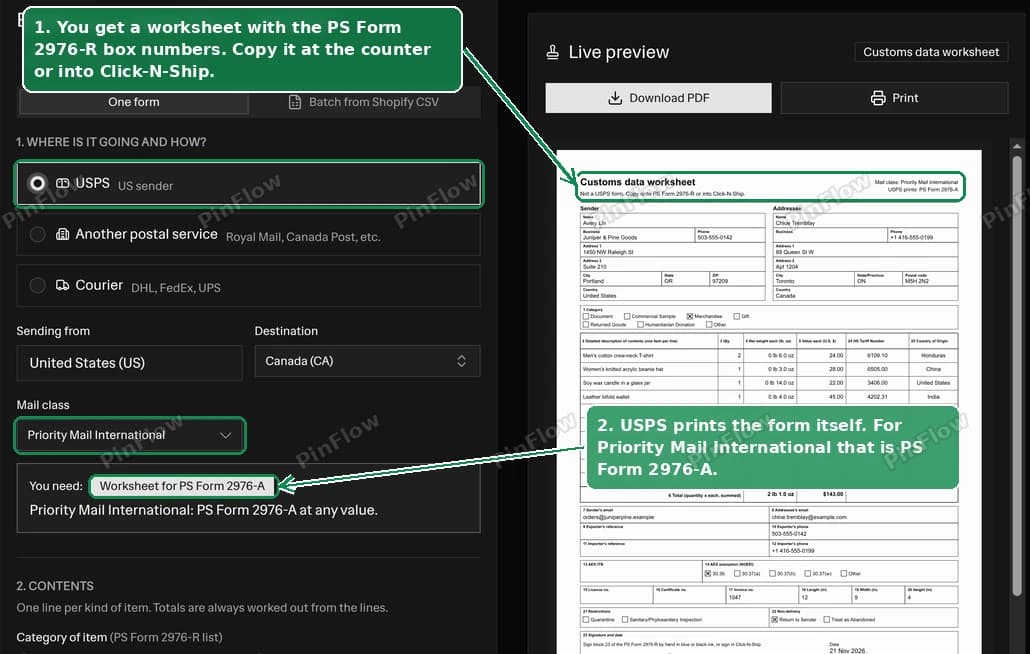 Customs form generator set to USPS, United States to Canada, with the "Worksheet for PS Form 2976-A" badge and the customs data worksheet preview
If you tick the NOEEI 30.37(a) exemption in block 14, the tool adds up the value of each Schedule B or HTSUSA code (10 digits, with US-made and foreign-made goods kept apart, as 30.37(a) requires) and stops the download when one is over $2,500, or when one line alone is. With only 6 or 8 digits it adds up the lines that share the code you typed, or whose longer code starts with it, and warns instead, because they may be different 10-digit codes. A code over $2,500 needs an AES filing and its ITN in block 13, unless another exemption applies (15 CFR 30.37(a)). Exports to Canada have their own exemption, 30.36, so for a Canadian address the tool points you to it instead of AES (15 CFR 30.36). It also warns when you enter a licence number or tick that the goods need an export licence with 30.37(a) or 30.36, because a licensed export needs an AES filing at any value (15 CFR 30.2(a)(1)(iv)).
PS Form 2976-A is the CP 72 set, which carries a CN 23
The IMM names PS Form 2976 as the UPU CN 22 and PS Form 2976-A as the UPU CP 72 (IMM 123.11). The CP 72 is the UPU manifold set (customs declaration and dispatch note) for parcels. One of its parts is the CN 23 customs declaration itself, with the receipt and dispatch note added. So the 2976-A carries the same declaration as a CN 23, inside a larger set.
How to Fill In the CN 22, Box by Box
The CN 22 is a customs declaration label for letter-post items and small packets. The current layout came into force on 1 June 2026 (UPU Circular 86/2024). It must be at least 74 x 105 mm and at most 105 x 148 mm.
- Designated operator. Your post, for example Royal Mail.
- Category. Tick one box (see the 2026 list below).
- (1) Quantity and detailed description of contents. One line per kind of item, such as "2 x men's cotton T-shirts".
- (2) Net weight. The weight of the goods on that line, without packaging.
- (3) Value and currency. The value of the line, with its currency.
- (4) HS tariff number. At least 6 digits.
- (5) Country of origin. Where the goods were made.
- (6) Total weight (in kg) and (7) Total value. The tool adds these up from the lines.
- (8) Date and sender's signature, under the declaration that the contents contain no dangerous or prohibited articles.
The CN 22 has no address boxes. The UPU instructions say to give the sender's full name and address on the front of the item. This tool leaves those fields off the CN 22 and brings them back if the form moves to a CN 23.
The CN 22 prints six content lines here. When an order has more lines, or a description too long for a row, the tool switches to a CN 23 and tells you which reason applied. It never shrinks text below a readable size to squeeze lines in.
How to Fill In the CN 23, Box by Box
The CN 23 is the full customs declaration for parcels, and for letter post that does not fit a CN 22. It is 210 x 148 mm, which is A5 landscape. The tool's A5 output uses a 210 x 148 mm sheet and draws the form frame 4 mm in, so office printers do not clip it.
- From and To. Name, business, street, postcode, city, country and phone for both sides.
- Sender's customs reference (if any), and the importer or addressee reference (a tax code, VAT number or importer code), plus the importer's fax or e-mail.
- (1) Description, (2) quantity, (3) net weight in kg, (5) value for each line.
- (7) HS tariff number and (8) country of origin of goods, which the form marks "for commercial items only".
- (4) Total gross weight, which includes packaging, so it must be at least the sum of the net weights.
- (6) Total value and (9) postal charges/fees. Show the currency on each line value and on the total.
- (10) Category of item plus an explanation, and (11) comments such as quarantine or sanitary inspection.
- (12) Licence, (13) certificate and (14) invoice numbers. The UPU instructions ask you to attach an invoice for all commercial items.
- (15) Date and sender's signature.
The right-hand column (office of origin, number of parcels, insured value, charges and the addressee's declaration) is for the post and the addressee. The tool prints it blank, including the sender's non-delivery boxes: tick one by hand if your post asks for it.
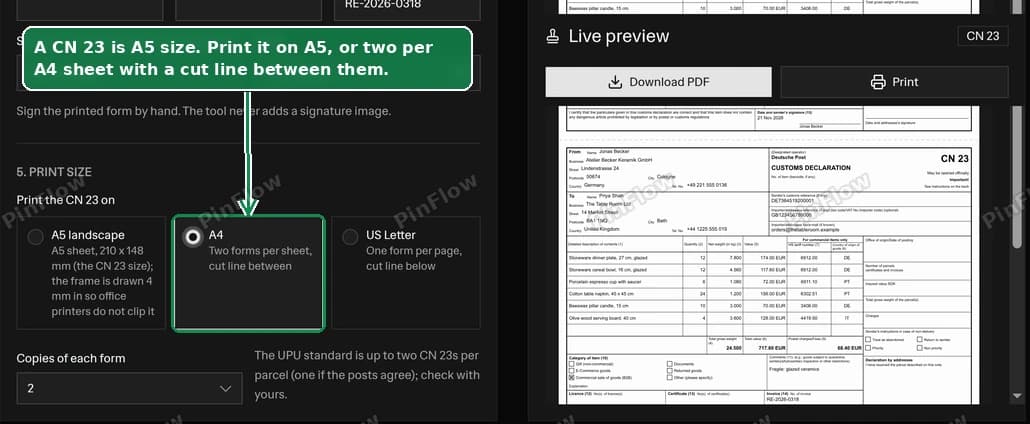 The Print size options A5 landscape, A4 with two forms per sheet and US Letter, with A4 selected and a two-form CN 23 preview
The 2026 UPU Categories
The category list changed on 1 June 2026 (UPU Circular 86/2024). "Commercial sample" was removed, "Sale of goods" became "Commercial sale of goods (B2B)", and "E-commerce goods" was added. The CN 22 and CN 23 now offer:
| Category | Use it for |
|---|---|
| Gift (non-commercial) | A present with no payment. Not acceptable for commercial items. |
| Documents | Written or printed papers such as letters or business records, not goods. |
| E-commerce goods | An online sale to a consumer (B2C), such as a Shopify order. |
| Commercial sale of goods (B2B) | A sale from one business to another. |
| Returned goods | Goods coming back to the seller. |
| Other (please specify) | Anything else, with an explanation. |
USPS keeps its own list on PS Form 2976-R: Document, Commercial Sample, Merchandise, Gift, Returned Goods, Humanitarian Donation and Other. The tool swaps lists when you switch between USPS and another post. It maps a choice across when the meaning is the same and asks you to pick again when it is not.
Write a Description Customs Will Accept
Customs rejects descriptions that do not say what the item is. The UPU rules say plainly that "descriptions of a general character shall not be admitted" (UPU Convention Manual). The form instructions give examples:
- The CN 22 instructions reject "clothes" and suggest "two men's cotton shirts".
- The CN 23 instructions reject "spare parts", "samples" and "food products".
- PS Form 2976-R rejects "samples", "food products" and "toiletries", and gives "men's cotton shirts" as its example.
The tool flags those words when they stand alone, and any one-word description. You can dismiss the note if your description is fine. A good description says what the item is, what it is made of, and who it is for: "women's knitted wool beanie hat" beats "hat".
HS Codes: How Many Digits by Country
An HS code classifies the goods for customs. The first 6 digits are the same in every country that uses the Harmonized System. Countries then add digits for their own tariff:
- UPU forms: the CN 22 and CN 23 instructions ask for the 6-digit HS tariff number.
- USPS: at least the 6-digit HS code on every item. It became mandatory on 1 September 2025 (Postal Bulletin 22682).
- United States: the HTSUS uses 10 digits, an 8-digit subheading plus a 2-digit statistical suffix.
- European Union: the Combined Nomenclature uses 8 digits (European Commission), and TARIC uses 10.
- United Kingdom: 10 digits for imports and 8 for exports (UK Trade Tariff).
The tool accepts 6, 8 or 10 digits, strips dots and spaces, and prints the code as 6109.10 or 6109.10.0012. Fewer than 6 digits is an error, and 7 or 9 digits gets a warning. It never suggests or looks up a code, because the sender or importer is legally responsible for the classification. Look codes up in the USITC HTS search, the EU TARIC database or the UK Trade Tariff.
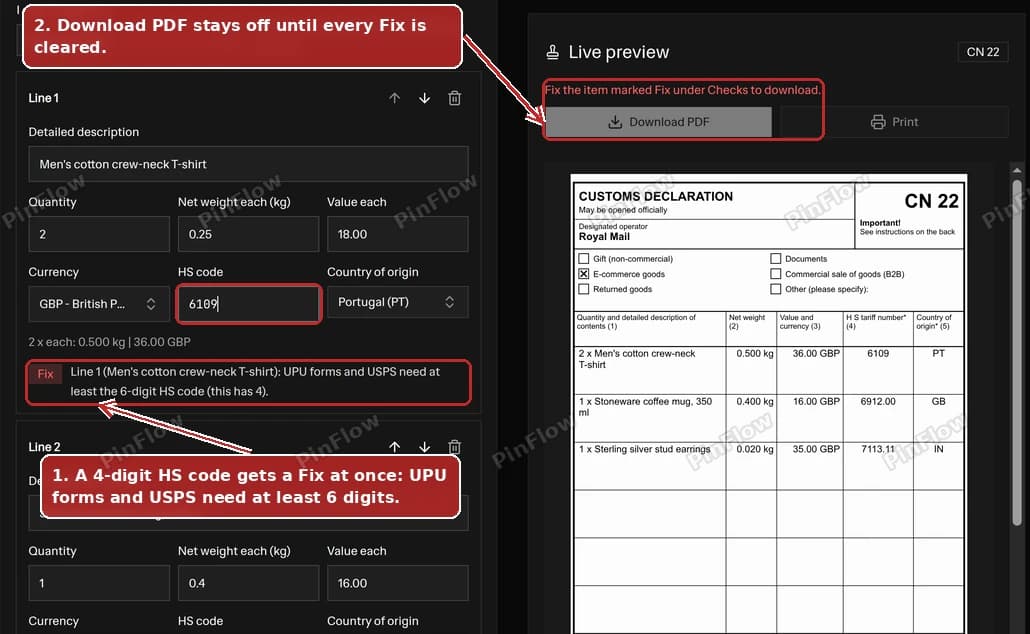 The HS code field showing 6109 with a red Fix warning that the code needs at least 6 digits, and Download PDF disabled
Country of Origin Is Where It Was Made
Country of origin is where the goods were produced, manufactured or assembled. It is not the country you ship from. A T-shirt made in Portugal and sent from the UK has origin PT. The UPU and USPS forms advise an origin on commercial items, so the tool requires one on every line of a commercial category (E-commerce goods, B2B, or Merchandise on USPS) and names the line that is missing one before it lets you download.
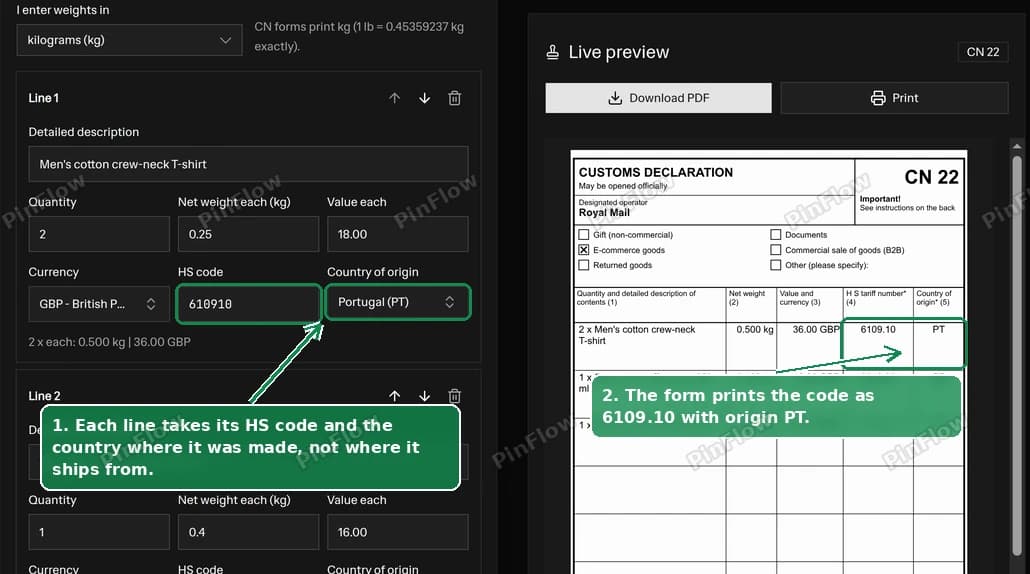 A product line in the customs form generator with HS code 610910 and country of origin Portugal (PT)
Shipping to the US in 2026: De Minimis and the CBP Postal Rule
The US used to let low-value parcels in duty free under the de minimis rule. That ended for parcels from all countries on 29 August 2025 under Executive Order 14324, and the statutory repeal follows on 1 July 2027 (both recounted in the CBP rule).
On 24 July 2026 a CBP rule for mail shipments took effect (Federal Register, FR Doc. 2026-12669). For postal shipments up to $2,500, the US importer (the owner or purchaser, or a licensed customs broker they appoint) files the entry. The data includes all applicable 10-digit HTSUS codes, the country of origin and the value of the shipment.
The rule says its requirements are in addition to the UPU requirements, so it does not change what goes on a CN 22 or CN 23. The form itself still asks for 6 digits. Your buyer files the 10-digit code, though, so putting the full 10 digits on the form (and on your invoice) saves them a lookup. The tool shows this as a note whenever the destination is the US.
Shipping to the EU: the EUR 3 Duty per Item
Since 1 July 2026 the EU charges a flat customs duty of EUR 3 per item on goods sold online to EU buyers (distance sales) in consignments with an intrinsic value up to EUR 150. It applies until 1 July 2028 (DG TAXUD), and the seller or importer pays it.
From 1 November 2026 the EU also charges a Union handling fee of EUR 2 per item on goods sold in distance sales, at any value and with no end date (DG TAXUD).
An "item" is not a unit. The European Commission says "the new duty will apply per item, based on tariff classification and not quantity" (European Commission, 29 June 2026). Its own example:
- 5 T-shirts: one tariff classification, so EUR 3.
- 3 T-shirts and a watch: two tariff classifications, so EUR 6.
For an EU destination and a sale category (E-commerce goods, or Merchandise on USPS), the tool groups your lines by HS code and origin and shows "about N items x EUR 3". If your lines are not in euros, you can enter an exchange rate for the EUR 150 check. It is labelled an estimate because the declarant decides the final declaration lines. For a gift, documents, returned goods, a commercial sample, a B2B sale or Other, it shows no estimate, because the duty covers goods sold online to consumers.
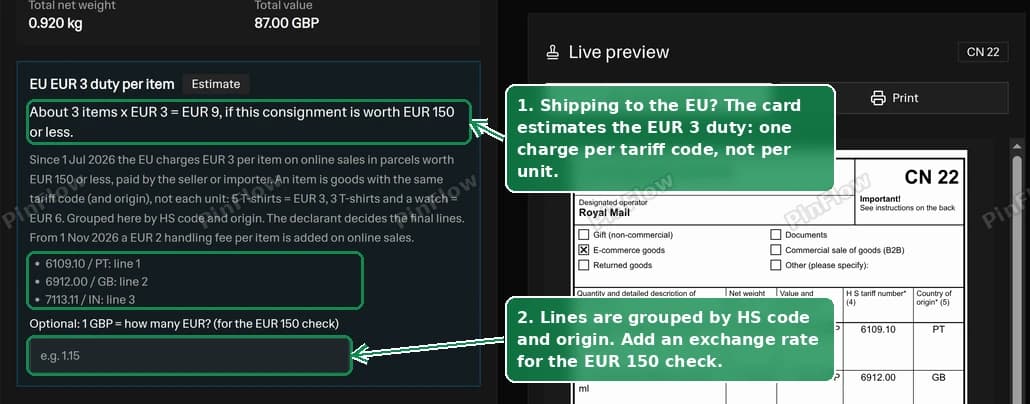 The EU EUR 3 duty per item card estimating 3 items at EUR 3, EUR 9, if the consignment is worth EUR 150 or less
Batch Customs Forms From a Shopify Orders CSV
Typing a customs form for every order is the slow part of international shipping. The customs form generator turns one Shopify orders CSV into one customs declaration form per order, from the export you already have.
- In Shopify admin, open Orders and export them as CSV (Shopify help).
- Drop the file on the batch tab. The tool groups the rows by order Name, takes the addressee from the shipping columns and the lines from the line-item columns.
- Shopify's export has no weight, HS code or origin, so these come from your SKU table. Start it from a Shopify products export, which fills the SKU and the weight in grams (Shopify help), then type the HS code and origin once per SKU. The table is saved in your browser for next time.
- Each order shows as a card with its warnings. An unmapped SKU gets fields to fix it in place, and the fix applies to every order with that SKU.
- Download one PDF with every ready form, in order. On the 4-per-A4 CN 22 sheet, orders fill the sheets one after another. Each form has its order number and ship-to name printed just outside the form frame, so you can match it to the right parcel.
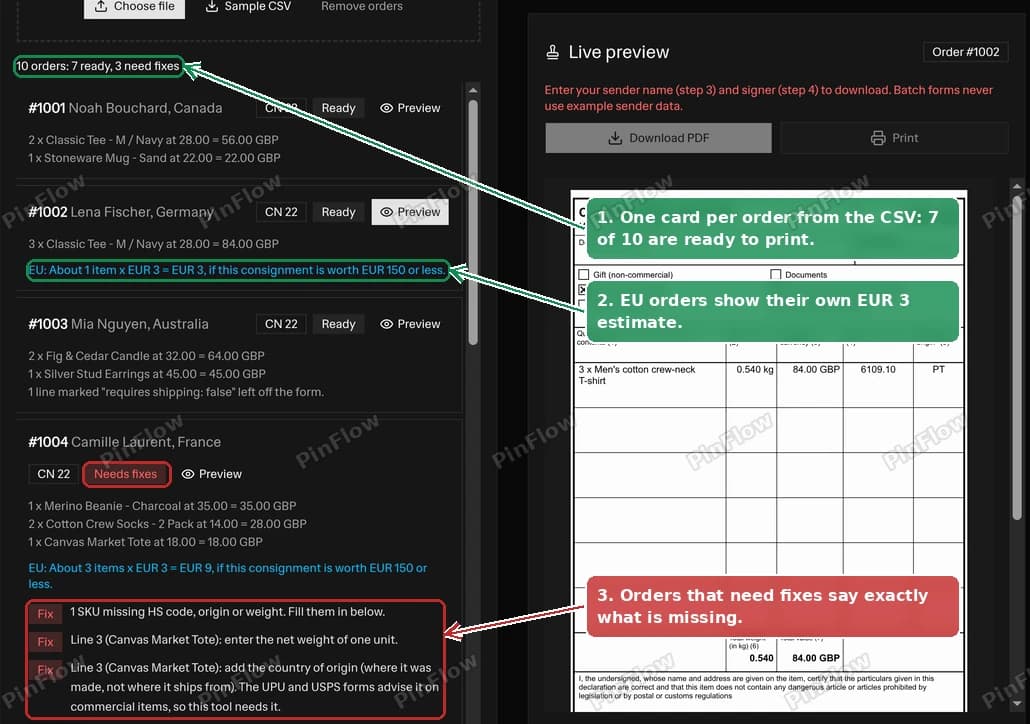 Batch order cards: 10 orders, 7 ready and 3 needing fixes, order #1002 to Germany with its EU duty estimate and order #1004 with "Needs fixes" reasons
Each card shows quantity x price for every line, so you can see at once if your export's price column means something different. The packing slip generator covers the slip that goes inside the parcel.
Frequently asked questions
Can I print my own USPS customs form?
No. USPS has required a fully completed, electronically generated customs form since 2020, and hand-filled 2976 forms are no longer accepted. A privately printed 2976 needs written USPS authorization and a USPS barcode. Use Click-N-Ship, or fill in the free PS Form 2976-R and hand it in at the Post Office counter. This tool's worksheet lists every 2976-R box so you can copy it across.
Which USPS customs form do I need?
It depends on the mail class. Priority Mail Express International uses PS Form 2976-B and Priority Mail International uses PS Form 2976-A, at any value. First-Class Package International Service takes PS Form 2976 (the UPU CN 22) or 2976-A, up to $400 in value and 4 lb in weight; over $400 it is not allowed. USPS prints the form from your data in Click-N-Ship or at the counter.
What is the difference between a CN22 and a CN23?
Both are UPU customs declarations. The CN 22 is a small label for letter-post items and small packets: it has no address boxes and only a few content lines. The CN 23 is a larger form with sender and addressee boxes, more lines, and boxes for licence, certificate and invoice numbers. Parcels always take a CN 23, and letter post moves to a CN 23 when the declaration does not fit on a CN 22.
Is there still a 300 SDR limit for the CN22?
Not in the letter-post rule. The forms amended in 2023 removed the value threshold, so a CN 22 can be used on letter post whenever the whole declaration fits on it. The 300 SDR figure survives in the commentary and in one line of the parcel rules, and each post can still set its own limits, so check with yours.
Is PS Form 2976-A the same as a CN23?
Not exactly. The USPS International Mail Manual names PS Form 2976 as the UPU CN 22 and PS Form 2976-A as the UPU CP 72. The CP 72 is a manifold set whose customs declaration part is the CN 23, plus a receipt and a dispatch note. So the 2976-A includes a CN 23, but it is a larger form set.
How many digits does an HS code need on a customs form?
At least 6. The UPU forms ask for the 6-digit HS tariff number, and USPS has required at least the 6-digit HS code on every item since 1 September 2025. Countries extend it: the US HTSUS uses 10 digits, the EU uses 8-digit CN and 10-digit TARIC codes, and UK import codes are 10 digits. This tool checks the length but never suggests a code.
What is the EU EUR 3 duty per item?
Since 1 July 2026 the EU charges a customs duty of EUR 3 per item on online sales (distance sales) in consignments worth up to EUR 150, until 1 July 2028. An item is goods sharing the same tariff classification, not each unit: the European Commission's example is 5 T-shirts = EUR 3, and 3 T-shirts plus a watch = EUR 6. The seller or importer pays it. From 1 November 2026 a EUR 2 Union handling fee per item is added on online sales, at any value.
What changed for parcels to the US in 2026?
The US suspended the de minimis exemption for all countries from 29 August 2025. CBP's postal entry rule, in effect from 24 July 2026, has the US importer file every applicable 10-digit HTSUS code, the country of origin and the value. It does not change what goes on a CN 22 or CN 23, but giving your buyer the 10-digit code and the origin helps them file.
Do I need a CN22 or CN23 for DHL, FedEx or UPS?
No. CN 22 and CN 23 are postal forms. Couriers usually take the customs data electronically when you book the shipment, and most ask for a commercial invoice for goods, which you can make with the free commercial invoice generator.
Is this customs form generator free?
Yes. It is free, needs no signup, and runs in your browser, so your orders CSV and SKU table are never uploaded. The PDF has no watermark and no logos. The tool is not affiliated with USPS or the UPU.
More FREE Store Finance & Documents tools
Price products, forecast ad profit, bill customers, and create invoices, purchase orders, packing slips, and other order documents.
Free Expense Report Template Generator
Build a professional expense report. Add line items, mileage, and a cash advance, pick from 20 templates, and download a print-ready PDF, PNG, or CSV. Free, no signup, no watermark.
Free Timesheet Generator
Make a weekly, bi-weekly, semi-monthly, or monthly timesheet online with live overtime and pay totals, pick from 12 templates, and download a print-ready PDF, PNG, or CSV. Free, no signup, no watermark.
Free Profit Margin Calculator
Calculate your product's selling price, gross margin, and net profit instantly. Factor in shipping and acquisition costs. Free, no signup.
Free Dropshipping Profit Calculator
Enter product cost, markup, ad spend per sale, and shipping to see your selling price, gross margin, and true net profit per dropshipping order. Free, no signup.
Free Print on Demand Profit Calculator
Enter provider base cost, markup, ad spend per sale, and shipping to see your selling price, gross margin, and true net profit per print on demand order. Free, no signup.
Free Markup Calculator
Turn cost and markup into your selling price, gross profit, and margin. Convert markup to margin, see your revenue multiplier, and price in bulk with CSV export. Free, no signup.
Free Etsy Fee Calculator
See every Etsy fee and your exact net payout, then switch to Stripe, Shopify, Square, Depop, Mercari, Poshmark, Reverb, or PayPal. Line-by-line breakdown, profit and margin, and a reverse net-to-price mode. Free, no signup.
Free Stripe Fee Calculator
See Stripe's processing fee and your exact net payout - 2.9% + $0.30 online, 2.7% + $0.05 in person. Line-by-line breakdown, profit and margin, and a reverse net-to-charge mode. Free, no signup.
Free Square Fee Calculator
See Square's processing fee by acceptance method - 2.6% + $0.15 in person, 2.9% + $0.30 online, 3.3% + $0.30 invoice, 3.5% + $0.15 keyed - and your exact net deposit. Profit, margin, and a reverse mode. Free, no signup.
Free Shopify Fee Calculator
See Shopify Payments processing by plan (Basic, Grow, Advanced), the transaction fee a third-party gateway adds, and your exact net payout. Profit, margin, and a reverse mode. Free, no signup.
Free Depop Fee Calculator
See what you keep on a Depop sale under the 2024 US structure - no seller selling fee, just 3.3% + $0.45 processing. Profit, margin, and a reverse net-to-price mode. Free, no signup.
Free Mercari Fee Calculator
See what a Mercari sale leaves you under the 2025 US structure - a flat 10% selling fee on item plus shipping, no seller processing fee. Profit, margin, and a reverse mode. Free, no signup.
Free Poshmark Fee Calculator
See your exact Poshmark earnings with the real US tiered fee - a flat $2.95 under $15, otherwise 20%. Profit, margin, and a reverse net-to-price mode. Free, no signup.
Free Reverb Fee Calculator
See what a Reverb sale leaves you: a 5% selling fee on item plus shipping (capped at $500) plus processing of 3.19% + $0.49 (2.99% + $0.49 Preferred). Profit, margin, and a reverse mode. Free, no signup.
Free Reverse Sales Tax Calculator
Back the sales tax out of any total. Find the price before tax and the tax amount from a gross total, with US state and Canada rate presets. Free, no signup.
Free ROAS Calculator
Calculate return on ad spend, break-even ROAS, and target ROAS, plus the ad budget needed to hit your revenue goal. Free, no signup.
Ecommerce Conversion Rate Calculator
Turn visitors and orders into your conversion rate, see revenue per visitor, and project the extra revenue from hitting a target rate. Free, no signup.
Free Break-Even Calculator
Find the units and revenue you need to cover costs. Calculate your break-even point, contribution margin, and the sales needed to hit a profit goal. Free, no signup.
Free Customer Lifetime Value Calculator
Calculate customer lifetime value (CLV) two ways - historic and predictive - see net value after acquisition cost, and get a plain-English CLV:CAC health verdict. Built for Shopify and ecommerce. Free, no signup.
Free Customer Acquisition Cost Calculator
Calculate customer acquisition cost (CAC), compare blended vs paid CAC by channel, and get an LTV:CAC health verdict plus the CAC payback period. Built for Shopify and ecommerce. Free, no signup.
Free Shopify Profit Calculator
Calculate net profit and margin per order after COGS, shipping, ads, returns, and real Shopify plan and payment fees. See break-even CPA and ROAS, a profit waterfall, and the order volume where each Shopify plan becomes the cheapest. Free, no signup.
Free Invoice Generator
Create professional invoices with your logo, line items, tax, and discounts. Live preview and instant PDF download. Free, no signup.
Free Packing Slip Generator
Create a clean packing slip for any order. Add your logo, ship-to address, and items, then download a print-ready PDF. No prices, no signup.
Free Purchase Order Generator
Create a purchase order to send your supplier. Add the vendor, line items with agreed prices, and a delivery date, then download a PDF. Free, no signup.
Free Commercial Invoice Template
Create a customs-ready commercial invoice for international shipping. Add HS codes, country of origin, Incoterms 2020, weights and the declaration, then download a PDF. Free, no signup.
Free Proforma Invoice Template
Create a quote-style proforma invoice you can send before the sale is final. Add a valid-until date, itemised freight, and optional customs fields and Incoterms 2020, then download a PDF. Free, no signup.
Free Credit Memo Template
Create a print-ready credit memo that reduces what a customer owes on a prior invoice. Reference the original invoice, list the credited items, and the tool computes the credit total, then download a PDF. Free, no signup.
Free Bill of Lading Template
Create a print-ready straight bill of lading for domestic LTL freight. Add the shipper, consignee, carrier, freight lines with weight and NMFC class, and freight charge terms, then download a PDF. Free, no signup.
Free Work Order Template
Create a print-ready work order for a service call, preventive maintenance, HVAC, plumbing, construction or auto repair job. Add the service location, equipment, task checklist, labor and parts, then download a PDF with technician and customer sign-off. Free, no signup.
Free Order Form Generator
Create a professional order form template with line items and live totals. Add your logo, customer, and prices, then download a PDF. Free, no signup.
Free Quote Generator
Create a professional price quote with your logo, client details, line items, and a valid-until date. Live preview and instant PDF download. Free, no signup.
Free Estimate Generator
Create a professional job estimate with your logo, client details, line items, and an estimated total. Live preview and instant PDF download. Free, no signup.
Free Packing List Generator
Create an itemized packing list for ecommerce, wholesale, and freight shipments. Add shipper, consignee, and contents, then download a PDF. Free, no signup.
Free Delivery Note Generator
Create a delivery note with a signature line for proof of delivery. Add your details, the deliver-to address, and items, then download a PDF. Free, no signup.
Free Return Form Generator
Create a printable return form or RMA form for ecommerce returns. Add the return-from address, items, and reason, then download a PDF. Free, no signup.
Free Shipping Label Generator
Make a printable shipping label with From / To and package details. Pick a 4x6, half-sheet, or Avery template, add a barcode or QR, bulk-generate from CSV, and download PDF, PNG, or SVG. No email, no signup, no watermark.
Free Shopify Order Bill Splitter
Split a group Shopify order fairly. Import items from a product link, assign who shares what, split shipping, tax, and discounts, and see who pays whom with the fewest payments. Free, no signup.
Free Facebook Ads Calculator
Forecast your Facebook ad profits with real industry benchmarks, interactive sliders, and reverse budgeting. See ROAS, CPA, and net profit instantly. Free, no signup.
Free Instagram Ads Calculator
Forecast your Instagram ad costs and profits with real Instagram benchmarks, interactive sliders, and reverse budgeting. See ROAS, CPA, and net profit instantly. Free, no signup.